Field software In development
Doorstep to paid bill, off one count.
The counting and the knocking keep working on a street with no bars — and go up when the signal does.
Field software for crews who knock doors and sell home services. Eighteen things work today; the rest is a list with weeks against it.
- Count once at the door; the quote, the job and the bill come off it.
- Every door keeps its pin on a coloured map; come-backs keep their own list.
- Exterior cleaning first, then the trades that knock.
things it does today, all printed below so you can count them.
and the counting and the knocking carry on regardless.
becomes the quote, the job and the bill. Nobody retypes it.
logos, testimonials and prices, because there are none to show yet.
One day, from the step to the money
Three beats. Every screen on this page is a whole phone screen out of the running app; the customers in them are made-up.
Count the house, and the count is the quote
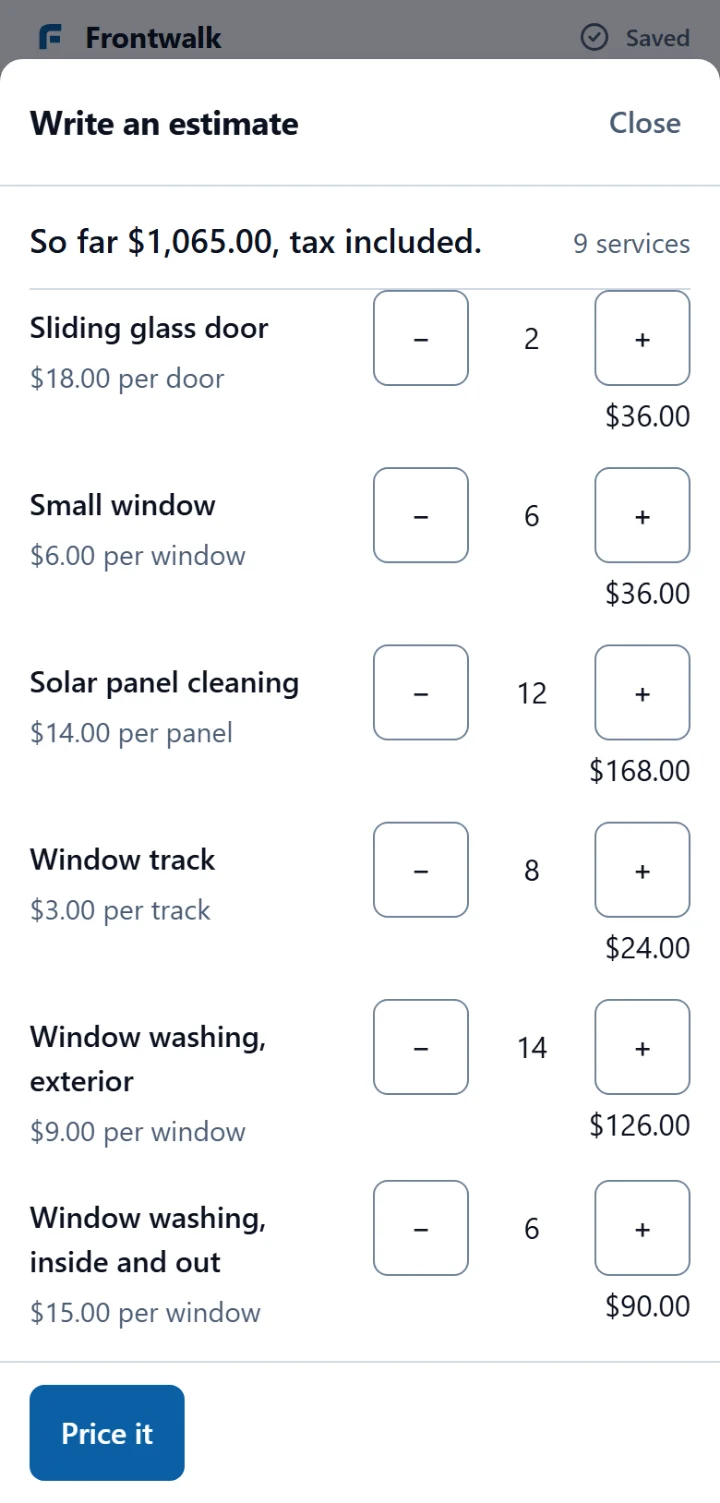
Price a house at the door by counting windows, screens, tracks and doors with + and −, and watch the total move as you count. Add a line that is not in the price book, type its price, and it joins the same sheet.
Turn what you counted into a quote without retyping any of it, and the office prices that saved quote the same way the phone previewed it.
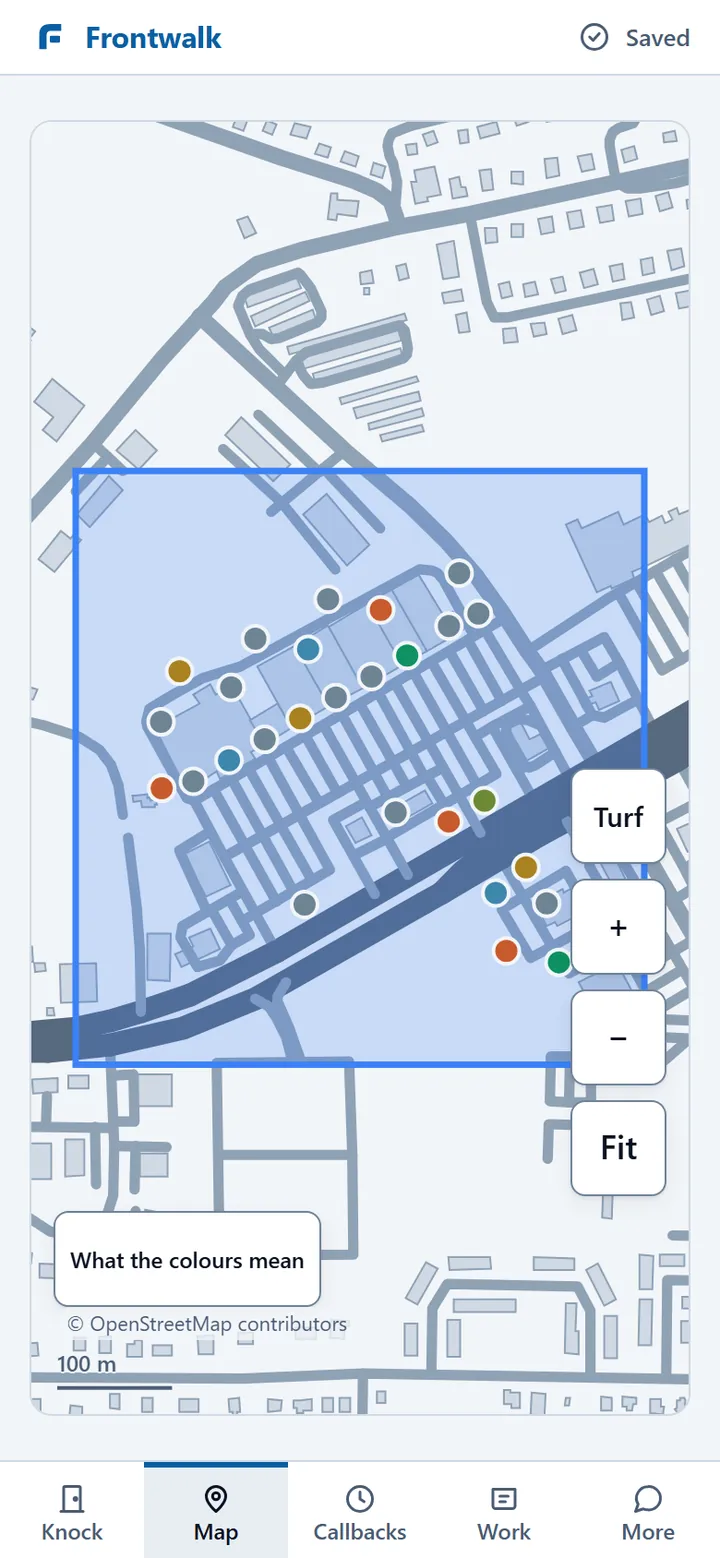
Whatever the door said — sold, not home, come back — it keeps its pin on the map.
One flat price book, one set of rows. That screen is at the top of this page: plus and minus, big enough for a thumb on somebody's porch.
A dead zone is still a working street
Work a street with no signal: the app opens, the counting and the knocking keep working, and everything you did is sent the moment the phone has bars again.
Nothing you press in the dead zone is lost: the phone keeps your presses in the order you made them and sends them in that order.
For whoever checks software for you: writes park in a FIFO outbox in batches capped at 512 KB and replay in the order the rep made them, and the service worker is forbidden from ever answering a sync read from cache.
The money closes where the sale happened
Mark a job finished and raise its bill from the lines that were quoted, with one piece of work never getting two bills.
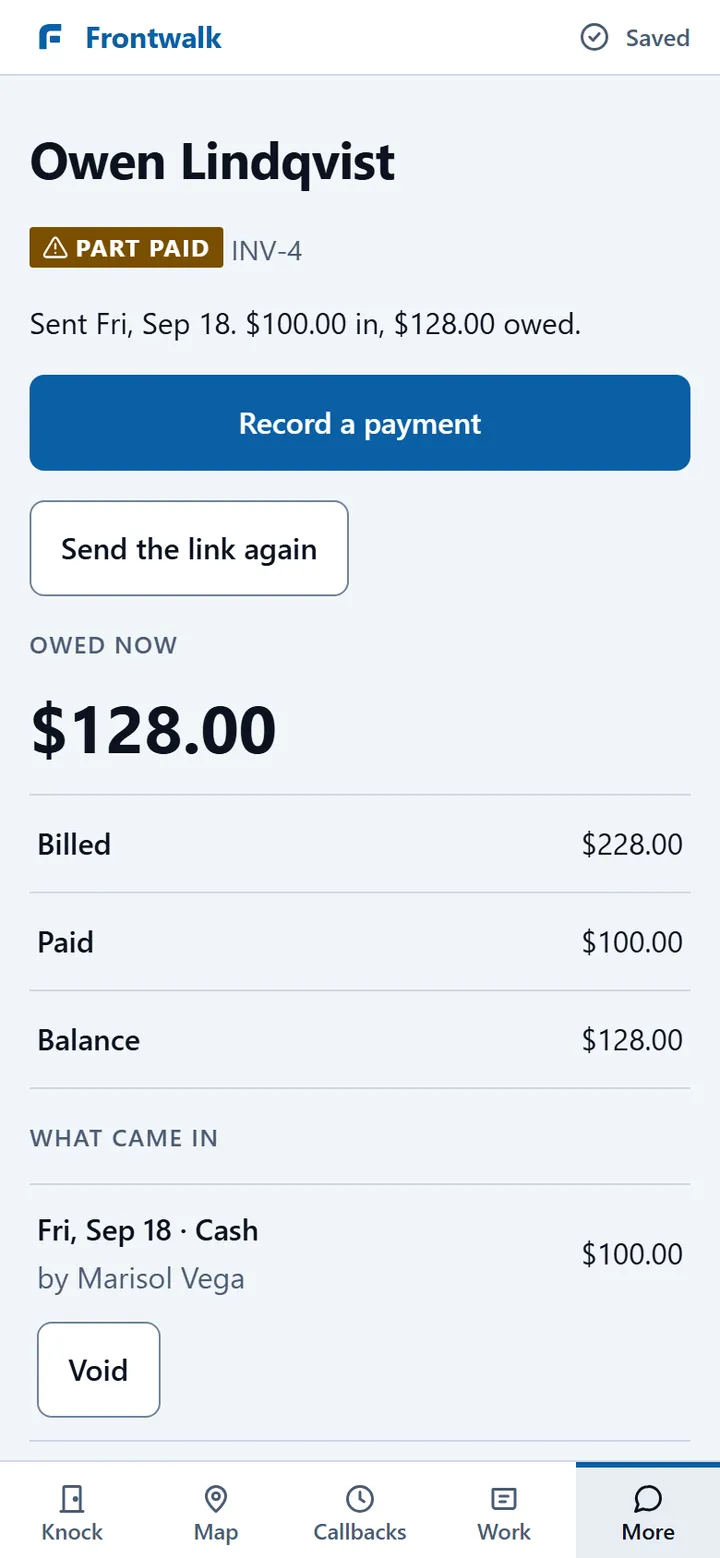
Record what came in against the bill — a cheque or cash taken at the door, part payments included, with the change owed worked out for you.
Working out what is finished but not billed used to take ten to sixteen seconds across a whole organisation. It now answers in 42 ms on a test fixture of 5,000 finished jobs and 4,500 bills.
Ask about the pilot
If you run a crew that knocks, tell us what you sell, how many people knock for you and what town you work. That is the whole ask.
This opens your mail app. Nothing is sent until you send it. hello@frontwalk.app
Everything that works today
Eighteen lines, printed in full so you can count them. The headings are ours; the lines are the build list.
At the door
- Price a house at the door by counting windows, screens, tracks and doors with + and −.
- Add a line that is not in the price book, type its price, and it joins the same sheet.
- Turn what you counted into a quote without retyping any of it.
- Knock a door and mark what happened — sold, not home, come back, not interested — with an undo on the same screen for a wrong press.
- Work a street with no signal; everything you did goes up when the bars come back.
- See the doors you worked, coloured by what happened, on a map whose every legend row carries its own icon as well as its colour.
- Keep a list of the houses that asked you to come back, with the time they said.
The day's work
- Open one board in the morning that shows only what needs a press: work you missed, today's work, quotes waiting to be booked, finished work nobody billed, and bills past due.
- Book an approved quote as a job on a day, and put a named person on it.
- When it rains, move a whole day of work to another day in one press, with the app naming the jobs it could not move.
The money
- Raise a bill from the lines that were quoted — never two bills for one job.
- Take a cheque or cash at the door, part payments and change included.
- Send a customer a link to their own bill, which becomes their receipt once it is paid.
- Withdraw a bill that was wrong and raise a corrected one, with the trail saying who did what.
The office
- Keep customers with their history, and see every quote, job and bill from their record.
- Take a quote request from your own public page onto the same sheet the reps use at the door.
- Set your business details, the price book and the tax rates in Settings, and retire a rate without losing its history.
- See how many doors, conversations and sales each rep had today.
What Frontwalk is not going to do
Five decisions, each with its reason. A roadmap that never says no is a wish list.
No second pipeline board, no kanban, no automation engine — Frontwalk stays the field tool and hands those facts to the owner's own CRM.
A job has a day, never a minute, so there is a crew-by-day board and a Move sheet instead of drag-and-drop scheduling.
One-to-one sending only, and no texting inbox until the carrier approves the number: bulk texting on a new registration is the fastest way to lose it.
One flat price book with each window size, wash, gutter and panel as its own row, instead of a calculator per service line.
Commissions, payroll, expenses and equipment inventory: a spreadsheet out of the export until a crew actually asks.
What comes next, in the order it gets built
Weeks count from the start of the run, not from a calendar date. The last one waits for a second crew.
Eighteen things, todayThe list above, every line of it running.
A door gets a typed address, remembers the customer it became, and can record a hanger or a flyer left.
An owner draws a territory on the map, names it, and assigns it to a rep.
Invite a crew member by link, put two people on one job, and let a technician open their own day, start it and finish it.
Before and after photos on a job, taken with no signal, uploaded when it returns, on a page the customer can open.
Quotes, bills and receipts go out by email from Frontwalk, and each one records whether it was delivered or bounced. Texting follows when the carrier approves.
A finished paid job queues a review request somebody approves, and a customer can go on a quarterly plan that raises the next visit.
Doors, contacts, quotes, sales and revenue over today, this week or this month, on a home screen with the quick actions.
Import a customer list, merge duplicates, and hand a leaving rep's work to somebody else. Export already works: everything a crew has put in comes back out as files, on request, today.
Ten seconds: is this for you?
If two of these three are true, the ask below is for you.
You knock doors
What happened at each door has to end up somewhere other than a rep's memory.
You sell home services
Exterior cleaning first — windows, washing, gutters, panels — then the trades that knock.
You have been sold vapour
Somebody already took your money for a demo that never shipped, so this page shows the screens and prints the whole roadmap.
Ask about the pilot
If you run a crew that knocks, tell us what you sell, how many people knock for you and what town you work. That is the whole ask.
This opens your mail app. Nothing is sent until you send it. hello@frontwalk.app
Two things you can check first: it is deployed and it answers, at staging.frontwalk.app. And the roadmap above is a real list — the pilot crew's 129 requests were mapped against the code: 33 built, 42 half built, 54 missing.